
When looking at new Point of Sale systems, one of the most important aspect for buyers to look at is whether or not the software is locked to a specific processor. Sometimes hidden, these locked processors can put you and your business into a position of never ending increases to the fees, giving up the option to shop around for better rates, and contracts that can charge you predicted future earnings if you ever want to leave.
No all Point of Sale software requires customers to switch to their processing and only charges a transparent monthly fee to use the software. New Mexico POS takes a strong stance of not forcing any customer into a payment processing position and believes anyone seeking Point of Sale software should be informed how transparent processing and pricing looks.
Your POS System and Payment Processor Do Different Jobs
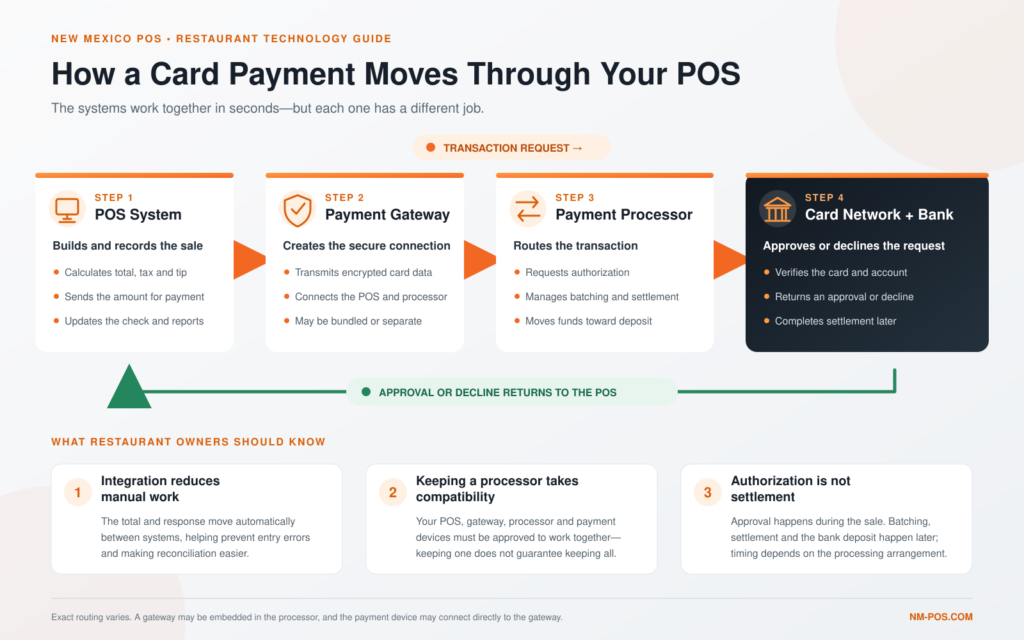
There are four main parts within taking payments at a Point of Sale terminal and each part is in a chain that makes it all work.
- Point of Sale Software + Hardware
- Payment Terminal
- Processor
- Gateway
A Point of Sale software can and most likely will handle all business aspects. From the Front of House putting in orders to the Back of House receiving kitchen chits, and customers entering items Online or Kiosk, the software takes all the data and compiles into one central place for the End of Day balancing.
A payment terminal, whether it be stand alone or integrated into the software, takes card information and stores it securely.
The processor authorizes transactions and deposits funds into a merchant’s account. A processor may also be the Point of Sale software provider, thus locking a customer who uses the software to use their processing.
Lastly, the Gateway or payment integration connects the processor to the POS. The merchant rarely sees this as it works in the background, securely communicating all data between the software, hardware, and processor.
The Three Ways a POS Can Work With Credit Card Processing
| Payment Arrangement | How It Works | Can You Keep Your Processor? |
|---|---|---|
| Bundled or Closed System | The POS software, payment hardware, and credit-card processing are provided as one package. Using the POS generally requires using the provider’s designated payment service. | Usually not. Changing processors may also require changing the POS system or using a separate payment terminal. |
| Processor-Flexible Integrated System | The POS supports integrated payments through multiple approved processors, gateways, or payment platforms. Transactions flow directly between the payment device and the POS. | Often, yes. Your processor, gateway, equipment, and restaurant payment features must still be compatible. |
| Standalone Payment Terminal | The credit-card terminal operates separately from the POS. Employees manually enter the check total into the terminal and record the payment in the POS. | Generally, yes. However, the lack of integration can slow checkout, increase entry mistakes, and complicate reconciliation. |
Payment compatibility varies by POS provider, processor, gateway, equipment, and merchant agreement. Always confirm compatibility before signing a new POS or processing agreement.
When choosing a Point of Sale software, it’s important to keep these in mind as more times than not, the processor will carry through from the software at the business to the online ordering. This means the same processing fees will apply in every aspect of ordering when integrated.
It is also important to point out that not all payment hardware will be compatible when switching to a Processor-Flexible Integrated System, especially if it’s to another processor. For non-integrated hardware, such as Verifone, Ingenico, and PAX pinpad terminals, there still is somewhat of a chance of it working with new Point of Sale software.
What Determines Whether You Can Keep Your Current Processor?
Does the new POS support the processor?
When investigating Point of Sale software, it may be hard to find the direct question, can I keep my Processor? If possible, try to ask whether your processor or payment flatform is among of the POS software’s approved integrated list. This may be found on the company’s website or answered directly by reaching out.
Is the payment gateway compatible?
If the processor is supported by the Point of Sale software, the next question would be if the gateway is compatible. Many times if the processor is compatible, the Point of Sale software may require you to switch to another Gateway. This fee may be built into the Point of Sale subscription or in the Processor’s fee.
Can the existing terminals be reused?
If the processor and the software are compatible, the next question is whether or not the hardware would be able to be reused. This depends heavily on how old the hardware is and if it’s common sold within Point of Sale hardware economy.
Are restaurant payment functions supported?
If the terminals can be reused, it’s important that it has full functionality within the software. The most important aspects to retain are:
- Tips and tip adjustments
- Bar tabs and preauthorizations
- Split payments
- Refunds and voids
- Tableside payments
- Contactless payments
- Online ordering
- Offline payment operation
Is the restaurant under contract?
Lastly, most Processing companies can tie merchants into nasty and lengthy contracts. It’s important to know whether or not you’re still under contract, how long you have, and when is the “window” to cancel. A lot of processing companies will give you a short time frame to cancel your contract before auto-renew and/or high penalty fees.
What Could Happen When You Switch POS Systems?
- Keep the processor and existing terminals
The easiest outcome, but only possible when both the processing relationship and equipment are compatible. - Keep the processor but replace the terminals
A common possibility when the merchant account can remain but the new POS requires certified payment devices. - Change processors for a fully integrated setup
This may make sense if the new arrangement provides better pricing, support, hardware, or functionality. - Keep a standalone terminal temporarily
This can work as a transition, but it is generally less convenient than an integrated payment setup.
Why Payment-Processing Flexibility Matters
Credit-card processing is one of a restaurant’s largest ongoing operating expenses. When a POS system requires a designated processor, the restaurant may have limited ability to negotiate rates, compare competing offers, or change providers without also replacing its POS system.
Even a small difference in processing cost can become significant over time. For example, a difference of just 0.25 percentage points equals $250 per month on $100,000 in monthly card sales—or $3,000 over a year. Restaurants should therefore compare the complete processing arrangement, including transaction rates, monthly charges, gateway fees, equipment costs, chargeback fees, and contract terms.
Flexibility can also allow a restaurant to preserve a processing relationship that already works well. An existing processor may provide competitive rates, reliable deposits, responsive support, or favorable contract terms. Changing POS systems should not automatically require the restaurant to give up those benefits.
Just as importantly, processor flexibility protects the restaurant’s future choices. Processing rates, service quality, and business needs can change. A restaurant may add online ordering, handheld payments, new locations, or higher sales volume. With a processor-flexible POS, the owner may be able to evaluate other supported processing options without replacing the entire point-of-sale system.
Bundled payment processing is not automatically a bad choice. Having the POS and payments provided by one company can simplify installation, reporting, and technical support. The important question is whether the restaurant is choosing that arrangement because it offers the best overall value—or accepting it because the POS system provides no other option.
Before selecting a new POS, restaurant owners should understand which processors are supported, whether using another processor creates additional fees or limitations, and what would happen if they wanted to change processors later. The goal is not simply to find the lowest advertised rate. It is to choose a payment arrangement that provides competitive costs, dependable service, and enough flexibility to continue serving the restaurant as its needs change.
Questions to Ask Before Choosing a New POS
Bring this checklist to every POS demonstration. Ask for clear answers and get important pricing, processing, and contract terms in writing.
A Restaurant POS Should Not Take Away Your Choices
A point-of-sale system should support the way you choose to run your restaurant—not make important financial decisions for you. However, some newer POS platforms bundle their software, hardware, and payment processing into one closed arrangement. That can leave restaurant owners with little ability to negotiate processing costs, retain an existing merchant-services relationship, or make changes later without replacing the POS itself.
NX Restaurant takes a more flexible approach. Restaurants can choose the convenience of integrated processing through NX Pay or, when compatibility requirements are met, continue working with their current credit-card processor. This allows an owner to consider a new POS system without automatically walking away from competitive rates, reliable service, or an existing processing agreement that already works for the business.
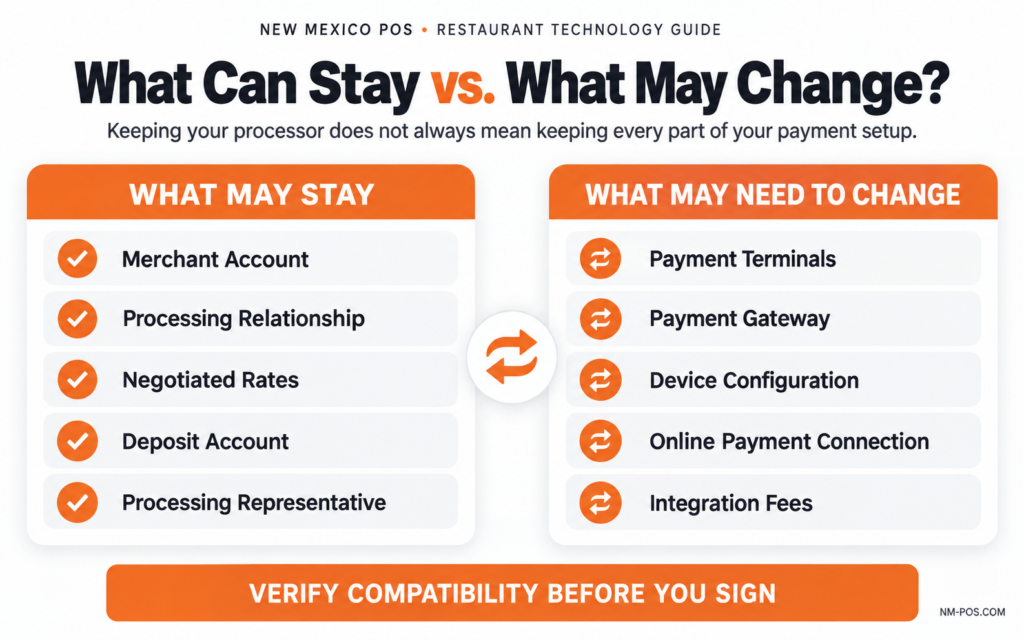
Keeping a processor does not necessarily mean that every part of the existing payment setup can remain unchanged. The processor, gateway, payment devices, and required restaurant functions must all be compatible with the POS. Existing card terminals may need to be replaced or reconfigured even when the underlying processing relationship remains in place.
That is why New Mexico POS reviews the restaurant’s current setup before installation. We can help determine whether the existing processor is compatible, explain any equipment or integration requirements, and compare the available options before the restaurant makes a commitment. Owners receive a clearer picture of the complete arrangement—not just an advertised software price or processing rate.
That flexibility extends beyond payment processing. NX Restaurant software is offered month to month, with transparent pricing and no long-term software commitment required. Restaurants receive local programming, installation, training, and support from a New Mexico company that understands their operation.
The best POS relationship should earn your business through dependable technology, fair pricing, and responsive service. It should not depend on making it unnecessarily difficult or expensive for you to leave.
POS and Payment-Processing Questions
Here are straightforward answers to some of the most common questions restaurant owners ask when changing POS systems.
Can I keep my current credit-card processor when changing POS systems?
Possibly. The new POS must support your processor, payment gateway, and required restaurant functions. Compatibility should be verified before you sign a POS or processing agreement.
Can I reuse my existing credit-card terminals?
Not always. You may be able to keep your merchant account while still needing different payment terminals. Device certification, encryption, firmware, ownership, and POS compatibility can all affect whether existing equipment can be reused.
Does processor-flexible mean every processor will work?
No. A processor-flexible POS supports multiple approved processing connections, but that does not guarantee compatibility with every processor, gateway, or payment device. Always ask the provider to confirm your specific setup.
Can I use a separate payment terminal with any POS?
A standalone terminal can often be recorded as an external payment, but it will not provide the same experience as a fully integrated connection. Employees may need to enter totals manually, increasing the chance of mistakes and making reconciliation more difficult.
Will keeping my processor preserve my current rates and contract?
Your existing processing terms may remain in place, but a new gateway, integration, or payment device could introduce additional costs. Ask your processor to confirm all rates, fees, equipment requirements, and contract terms in writing.
Will the same processor work with handhelds and online ordering?
It depends on the available integrations. A processor that works at the countertop may not automatically support handheld payments, online ordering, bar tabs, offline transactions, or every other payment channel the restaurant uses.
How can New Mexico POS help me evaluate my options?
New Mexico POS can review your current processing arrangement, determine whether it is compatible with NX Restaurant, and explain any equipment or integration requirements. We can also help you compare keeping a compatible processor with using integrated processing through NX Pay.